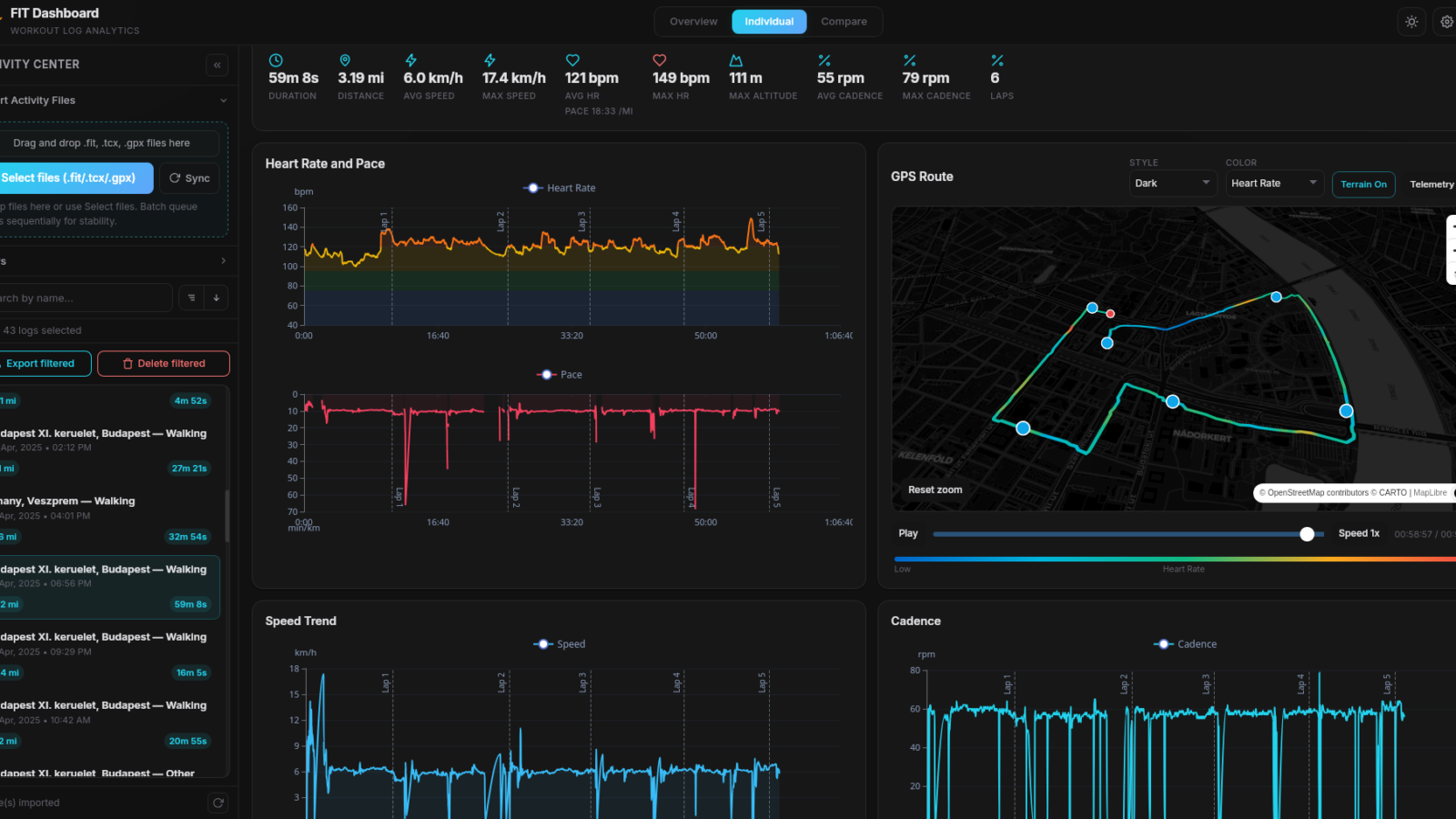
Garmin’s ecosystem is brilliant for capturing data — and frustrating the moment you actually want to own it. Every heart rate spike, GPS track, and recovery score lives behind a Garmin Connect login, scattered across dashboards you don’t control. A new free, open-source tool called FIT Dashboard finally changes that. It runs entirely on your own machine, reads your .fit files directly, and gives you a fast, modern analytics dashboard with zero cloud round-trip.
Notebookcheck covered the release this week, and as a coach who lives in training data, I had to dig in. Below is what FIT Dashboard actually is, how it differs from the wave of Garmin Connect MCP servers that have shown up for Claude and other LLMs, and a step-by-step quick-start guide. I’ll also be testing it on my own Garmin Enduro 3 and reporting back.
Post image credit: reddit user opendronelog
What is FIT Dashboard?
FIT Dashboard is a desktop application built by Arpan Ghosh that turns your raw Garmin activity files into an interactive analytics workspace. Under the hood it’s a Rust backend with a DuckDB embedded analytics database and a React + TypeScript frontend, packaged with Tauri for Windows, macOS, and Linux. There’s also a Docker mode if you’d rather self-host it as a private web app on your home network.
Crucially, it does not log into your Garmin account. You feed it the FIT, TCX, or GPX files you already own — either drag-and-dropped one at a time, or pulled in bulk from Garmin’s own data export. The app then renders the usual telemetry stack (pace, heart rate, cadence, altitude, power, temperature) plus map overlays colored by metric, comparison views between activities, and clean CSV/JSON/GPX/KML exports. It’s released under AGPL-3.0, the latest stable build is 0.1.0 (April 18, 2026), and it’s free.
Why local Garmin data analysis matters
Garmin’s own privacy policy spells out what flows into Connect when you sync: steps, distance, pace, heart rate, sleep, location, menstrual cycle data, hydration, and more — stored on servers in the U.S., U.K., or Australia. That data is private by default, but the moment you authorize Strava, TrainingPeaks, or any third-party integration, it leaves Garmin’s perimeter. For elite athletes, coaches, and frankly anyone who’d prefer their resting HR not become advertising signal, the calculus is simple: the fewer cloud hops, the better.
FIT Dashboard’s pitch is narrow but concrete: once your files are local, the analysis stays local. No telemetry, no remote sync, no account. For coaches reviewing rider data on a laptop without uploading it anywhere, that’s a meaningful workflow change.
FIT Dashboard vs Garmin Connect MCP servers — what’s the difference?
If you’ve followed the Model Context Protocol space, you’ve seen a handful of Garmin Connect MCP servers appear on GitHub — projects like epodivilov/garmin-connect-mcp, Taxuspt/garmin_mcp, and st3v/garmin-workouts-mcp. They let an LLM like Claude query your Garmin data through tool calls. They are very cool, but they solve a different problem.
| FIT Dashboard | Garmin Connect MCP servers | |
|---|---|---|
| Where the data lives | Local files imported into a local DuckDB on your machine | Pulled from Garmin Connect cloud via unofficial client libraries |
| Authentication | None — you only need the files | Garmin email + password or OAuth tokens stored on disk |
| What consumes the data | Human dashboard: charts, maps, comparisons | An LLM (Claude Desktop, Claude Code, etc.) via tool calls |
| Privacy posture | No cloud round-trip after export | Data flows through Garmin Connect and into the model context |
| Best for | Visual analysis, coach review, archival, file ownership | Natural-language Q&A, workout creation, scheduling |
In other words: MCP servers make Garmin Connect conversational. FIT Dashboard makes Garmin Connect optional. They can absolutely coexist — use the MCP server when you want Claude to summarize your last week of training, use FIT Dashboard when you want to dissect a single Zwift race or compare two FTP tests side by side without anything leaving your laptop.
Quick start guide: get FIT Dashboard running in 10 minutes
The fastest path from zero to a working dashboard, end to end:
- Download the installer. Go to the FIT Dashboard releases page and grab the right build:
.msior.exefor Windows,.dmgfor macOS,.AppImageor.debfor Linux. - Install and launch. On macOS, if Gatekeeper says the app is damaged, right-click and choose Open, or run
xattr -cr "FIT Dashboard.app". The app is unsigned, that’s expected. - Complete the local onboarding. Set a username and password — these are stored locally and protect access to the dashboard if you self-host.
- Request your Garmin data export. In Garmin Connect, go to Account > Account Information > Export Your Data > Request Data Export. Garmin emails a download link, usually within 48 hours.
- Find the FIT files. Unzip the archive and look in
DI_CONNECT/DI-Connect-Fitness-Uploaded-Files. That’s where your raw activities live. - Import. Drag the folder of
.fitfiles into FIT Dashboard, or use the sidebar import. Duplicate detection (file hash + start/end timestamps) keeps re-imports clean. - Explore. The Overview tab shows aggregate stats. Click any activity for telemetry charts, the GPS track on a map colored by HR or power, and comparison tools.
Prefer self-hosting? In the cloned repo, run cd docker && docker compose up -d, then open http://localhost:8088. Data persists in a Docker volume at /data/fit-dashboard. Note the project explicitly does not ship with TLS — keep it on your LAN.
Testing the FIT Dashboard on my Garmin Enduro 3
I’ll be running FIT Dashboard against the full activity library from my Garmin Enduro 3 over the next few weeks — long endurance rides, threshold blocks, and recovery weeks — and writing a follow-up review. The Enduro 3’s massive multi-day battery life means I have a lot of unbroken data to throw at it, including ultra rides where Garmin Connect’s web charts get sluggish above the 8-hour mark.
The interesting questions for any coach: does the local dashboard handle big files faster than Connect? Are the comparison views actually usable for week-over-week analysis? Does the map renderer cope with 12-hour GPS tracks? More to come.
FIT Dashboard works with any Garmin watch that produces standard FIT files — which is essentially the whole modern lineup. If you’re shopping for an upgrade and want a watch that pairs well with deep local analysis, these are the four I’d point cycling and ultra-endurance athletes at right now:
- Garmin Enduro 3 — what I run. Built for ultra-distance, with the longest battery life in Garmin’s solar-assisted lineup. Ideal if your activity files are routinely 6+ hours.
- Garmin Instinct 3 Solar (50mm) — the rugged, low-cost entry into the modern Garmin ecosystem. Solar charging, MIP display, weeks of battery, and full FIT file output.
- Garmin Instinct 3 AMOLED — same toolset as the Solar, with a bright AMOLED screen for athletes who train at dawn or in low light.
- Garmin Fenix 8 (51mm AMOLED) — the multisport flagship. Best maps, best sensors, best speaker/mic, best AMOLED. The data it produces is exactly what FIT Dashboard was built to chew through.
- Garmin Fenix 8 Pro — the newest flagship with LTE connectivity and microLED display options. If you want the absolute frontier of Garmin hardware, this is it.
Affiliate disclosure: links above are Amazon affiliate links. If you buy through them, I earn a small commission at no extra cost to you, which helps keep this site running.
The future of health and Fitness?
FIT Dashboard is the first credible answer to the question, “What if I just want to look at my own training data without uploading it anywhere?” It’s young — version 0.1.0 — but the architecture is sound, the workflow is honest, and the price is zero. For privacy-conscious athletes and coaches, it’s worth the 10-minute install. And if you’re already running a Garmin Connect MCP server for Claude, the two are complementary, not competing.
I’ll publish the eview once I’ve put real volume through the dashboard. In the meantime, grab the build, request your data export, and start owning your training files again.